
Download ABC Amber LIT Converter – convert LIT files, LIT to PDF, LIT to DOC, LIT to TXT, LIT to RTF, LIT to HTML, batch LIT conversion, LIT file converter
Overview
ABC Amber LIT Converter is a specialized utility designed to address the challenge of converting legacy .LIT files into modern, widely supported formats. The .LIT format, once used primarily by Microsoft Reader, has become increasingly outdated, limiting accessibility and compatibility across devices and platforms. This application provides a reliable solution for users who still maintain collections of .LIT documents and need to migrate them into formats such as PDF, DOC, RTF, TXT, or HTML. Its core purpose is to streamline document accessibility, ensuring that content remains usable regardless of evolving software ecosystems.
The target audience includes individuals managing personal libraries, educators preserving digital reading materials, and professionals handling archived documents. The app is particularly valuable for those who rely on older e-books or technical documentation stored in .LIT format. While the developer, MyUnisoft, has not provided additional background information, the application’s longevity since its release in 2008 suggests a stable and functional design. Despite its age, the tool remains relevant due to its focused functionality and consistent performance. In the broader productivity software landscape, ABC Amber LIT Converter fills a niche but essential role, offering a dedicated solution where general-purpose tools may fall short.
Key Features & Functionality
- Multiple Output Formats: The converter supports conversion to PDF, RTF, TXT, DOC, and HTML, enabling users to select the most appropriate format based on their needs—whether for printing, editing, or sharing.
- Batch Conversion Support: Users can process multiple .LIT files simultaneously, significantly reducing time and effort when managing large document sets.
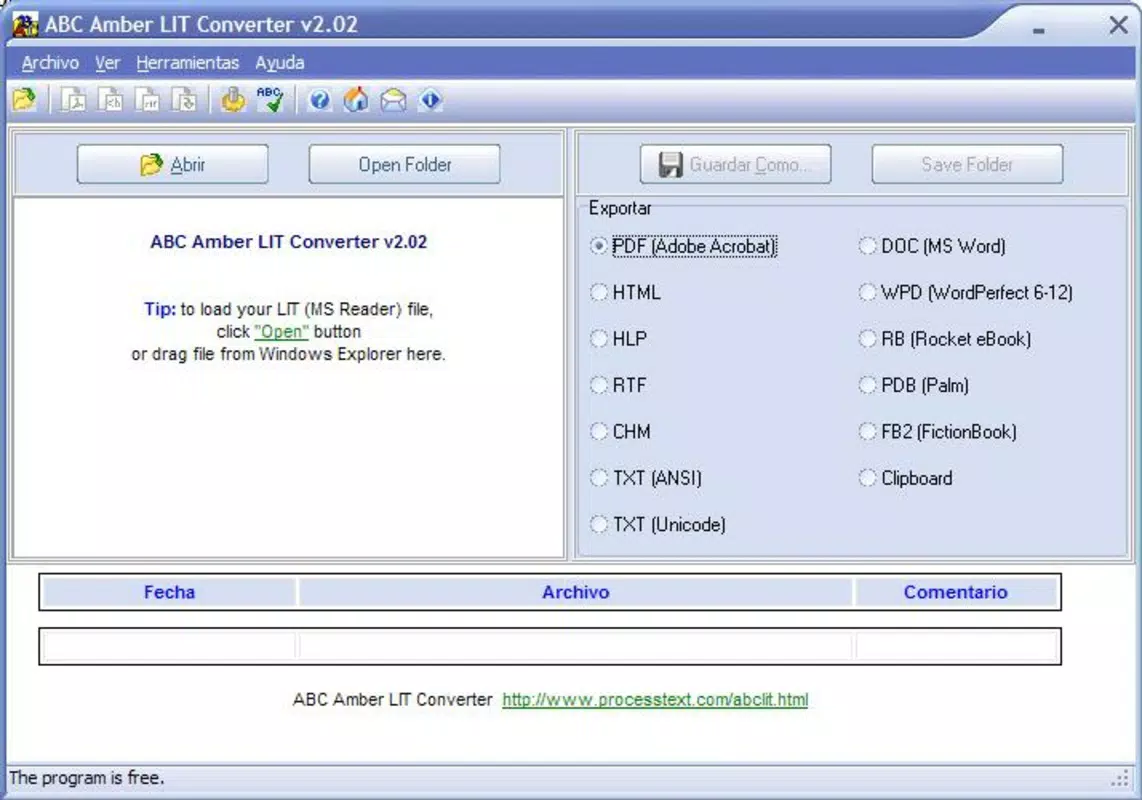
- User-Friendly Interface: Designed for simplicity, the interface allows users to select files, choose an output format, and initiate conversion with minimal steps, making it accessible to non-technical users.
- Language Support: With support for over 50 languages, the tool enhances global accessibility, allowing users from diverse linguistic backgrounds to operate it comfortably.
- Link Detection and Preservation: The software identifies and maintains hyperlinks within .LIT files during conversion, preserving the original document’s navigational structure and interactivity.
For example, a university researcher with a collection of historical e-books in .LIT format can use the batch conversion feature to convert dozens of files into PDFs for archival and sharing purposes. Similarly, a librarian digitizing old reading materials can convert .LIT files into editable DOC format for metadata tagging and cataloging. The ability to preserve links ensures that embedded references and citations remain functional after conversion.
Interface, UX & Performance
The user interface of ABC Amber LIT Converter is straightforward and minimalistic, prioritizing functionality over visual flair. Navigation is linear and intuitive: users load files, select output format, and execute conversion with a single click. This simplicity reduces the learning curve, making the app suitable for users with varying levels of technical experience. The layout is consistent across sessions, contributing to a predictable and efficient workflow.
Although the developer did not list formal performance metrics, the application’s lightweight design—only 1.2 MB in size—suggests efficient resource usage. It is likely to run smoothly on older Windows systems, though specific performance benchmarks were not provided. Responsiveness during conversion appears to be adequate, particularly given the tool’s focus on file processing rather than real-time interaction. Stability is implied by its long-standing presence in the market, though no formal reports on crashes or errors were shared. The absence of complex animations or background processes further supports consistent performance across different device categories.
Platform Compatibility & Technical Requirements
ABC Amber LIT Converter is designed for the Windows platform. The application is compatible with Windows operating systems, though specific version requirements were not listed. The software size is 1.2 MB, indicating a compact footprint that requires minimal storage space. Given its release date in 2008, the app likely supports older Windows versions such as XP, Vista, and 7, though compatibility with newer systems like Windows 10 or 11 has not been confirmed.
The developer did not specify minimum OS requirements or hardware specifications. Users should exercise caution when installing on modern systems, as legacy software may face compatibility or security challenges. No additional dependencies or permissions were mentioned. For optimal results, users are advised to check system compatibility before installation. The absence of mobile or cross-platform availability limits its use to desktop environments.
Pros and Cons
Pros
- Efficiently converts .LIT files to multiple modern formats
- Supports batch processing for time-saving bulk conversions
- Simple, intuitive interface suitable for all user levels
- Preserves hyperlinks during conversion, maintaining document integrity
- Lightweight at only 1.2 MB in size
Cons
- Platform limited to Windows only
- Release date from 2008 raises concerns about modern OS compatibility
- No mobile or web-based version available
- Price of $19.95 may be considered high for a niche utility
- Developer did not provide detailed technical specifications or updates
FAQ
Is ABC Amber LIT Converter safe to download and install?
The software is available from trusted sources and has been in use since 2008. However, as with any legacy application, users should ensure their system has up-to-date antivirus protection before installation.
Can I convert .LIT files to PDF using this tool?
Yes, ABC Amber LIT Converter supports conversion to PDF, making it ideal for creating printable or shareable versions of .LIT documents.
Does the app support multiple languages?
Yes, the tool supports over 50 languages, enhancing accessibility for international users.
Is there a free version available?
No, the app is a paid utility priced at $19.95. There is no free version or trial period mentioned in the provided information.
Can I use this on Windows 10 or Windows 11?
Compatibility with Windows 10 and 11 has not been officially confirmed. While some users may find it functional, the app’s age may lead to compatibility issues on newer systems.
Final Thoughts
ABC Amber LIT Converter remains a dependable tool for users navigating the transition from legacy .LIT files to modern document formats. Its ability to batch convert files while preserving links and supporting multiple output types makes it a valuable asset for archivists, educators, and professionals managing outdated digital content. Despite its age and lack of modern platform support, its focused functionality and low resource usage continue to serve a specific but important need.
For individuals with collections of .LIT e-books or documents, this utility offers a practical and efficient solution. While newer alternatives may exist, the reliability and proven track record of ABC Amber LIT Converter make it a strong choice for those seeking a no-frills, effective conversion tool. Its simplicity and versatility deliver clear value in a niche market.
Download ABC Amber LIT Converter now


